Python Exchange Rates API
Python Currency API
Get Live Exchange Rates in Python. Simple integration, comprehensive documentation, and reliable exchange rate data for your Python applications.
No card required. Free plan is 500 requests/month
import requests

url = "https://currencyapi.net/api/v2/rates"
params = {
    "key": "YOUR_API_KEY",
    "base": "USD",
    "output": "JSON"
}

response = requests.get(url, params=params)
data = response.json()

print(data)
Trusted by Python developers worldwide
Join 10,000+ developers who rely on our Currency API, with low latency JSON responses, dependable uptime, and reliable data sources.
Our API powers Python applications across industries—from fintech startups to enterprise e-commerce platforms. Built for scale, trusted by developers.

50M+ Requests Every Month
Built to handle high traffic smoothly and reliably.
10,000+ Happy Customers
Chosen by developers, startups, and growing teams.
Supporting Devs Since 2019
A proven platform you can count on long-term.
~50ms Average Latency
Fast responses for real-time Python apps and dashboards.
Our Pricing Plans
Get started with our Python Exchange Rates API for free. Perfect for Python developers building personal projects or testing. Upgrade to paid plans for production Python applications with higher limits, faster updates, and commercial usage rights.
Free
Perfect for personal projects
- 500 monthly requests
- Hourly updates
- Fetch currency rates in Python
- Rate limits (10 req/min)
- Commercial use
- Technical support
- Change base currency
Commercial
Built for production applications
- Up to 10M+ monthly requests
- Updates as fast as 60 seconds
- Historical rates back to 2000
- Official Python SDK included
- Convert endpoint for Python
- Commercial use allowed
- Technical email support
- Team management
- Multiple API keys
- IP whitelisting/blacklisting
How Our Python Currency API Works
Sign Up
Sign up for a free account to get started with our API. Paid plans start at just $9.99/month.
Get Your API Key
After signing up, you'll receive an API key. Use this key to authenticate requests to our API endpoints.
Integrate the API
Use our Python SDK (pip install currencyapinet) or code samples with the requests library to quickly integrate.
Getting Started: Python Integration
Implement our Python Currency API in your application using either the standard requests library or our official Python SDK. Both approaches are fully supported and documented.
import requests

url = "https://currencyapi.net/api/v2/rates"
params = {
    "key": "YOUR_API_KEY",
    "base": "USD",
    "output": "JSON"
}

response = requests.get(url, params=params)
data = response.json()

print(data)
Using Our Python SDK
Our Official Python SDK (currencyapinet) provides a clean, Pythonic interface with type hints, error handling, and a fluent API.
Install with pip install currencyapinet and enjoy a more intuitive development experience. Perfect for Django, Flask, FastAPI, and any Python application.
from currencyapinet.currency import Currency

currency = Currency('YOUR_API_KEY')
result = currency.rates().base('USD').get()
print(result)
AI Assisted Python Integration
Integrate our Exchange Rates API effortlessly with AI assistants. We provide a simple llms.txt file that contains all the information about our API in a format optimized for AI assistants and Large Language Models.
AI assistants like ChatGPT, Claude, Cursor, Windsurf, and others can quickly understand our API capabilities and help you integrate Currency API more efficiently into your Python applications.
Simply reference our llms.txt file and let AI assistants guide you through Python integration, code examples, and best practices. More information can be found on our LLM Documentation page.

What Python Developers Build With Our API
See how Python developers use our Currency API endpoints to power their applications. From real-time rates to historical analysis, discover the possibilities.
import requests

url = "https://currencyapi.net/api/v2/rates"
params = {
    "key": "YOUR_API_KEY",
    "base": "USD",
    "output": "JSON"
}

response = requests.get(url, params=params)
data = response.json()

print(data)
Live Exchange Rates
Fetch real-time exchange rates for 152+ currencies in a single API call. Perfect for building currency converters, e-commerce pricing engines, and financial dashboards.
Python developers use this endpoint to power real-time currency displays, update product prices dynamically, and build trading applications that need current market rates.
Currency Conversion
Convert a currency from one to another with a single API request. Ideal for checkout flows, invoice generation, and payment processing systems.
Python developers integrate this endpoint into Django and Flask applications to handle multi-currency transactions, calculate shipping costs in different currencies, and build international payment gateways.
import requests

url = "https://currencyapi.net/api/v2/convert"
params = {
    "key": "YOUR_API_KEY",
    "from": "GBP",
    "to": "USD",
    "amount": 100,
    "output": "JSON"
}

response = requests.get(url, params=params)
data = response.json()

print(data)import requests
url = "https://currencyapi.net/api/v2/history"
params = {
"key": "YOUR_API_KEY",
"date": "2026-01-01",
"base": "USD",
"output": "JSON"
}
response = requests.get(url, params=params)
data = response.json()
print(data)Historical Exchange Rates
Access Historical Exchange Rates for a specific date going back to the year 2000. Essential for financial reporting, backtesting trading strategies, and analyzing currency trends over time.
Python developers use historical data to build various graphs, analytics dashboards, generate financial reports, perform currency trend analysis, and create data visualizations for business intelligence tools.
Timeframe Analysis
The Timeframe Endpoint allows you to retrieve rates for muliple historical dates in one request. Perfect for analyzing currency movements over weeks, months, or years.
Python developers leverage timeframe data to build portfolio tracking tools, create currency performance reports, analyze seasonal trends, and power financial forecasting models in data science applications.
import requests

url = "https://currencyapi.net/api/v2/timeframe"

params = {
    "key": "YOUR_API_KEY",
    "start_date": "2026-01-01",
    "end_date": "2026-01-10",
    "base": "USD",
    "output": "JSON"
}

response = requests.get(url, params=params)
data = response.json()

print(data)
Powerful Dashboard for Python Developers
Manage your Python API usage, monitor performance, and access powerful analytics through our intuitive dashboard. Everything you need to optimize your Python currency data integration.
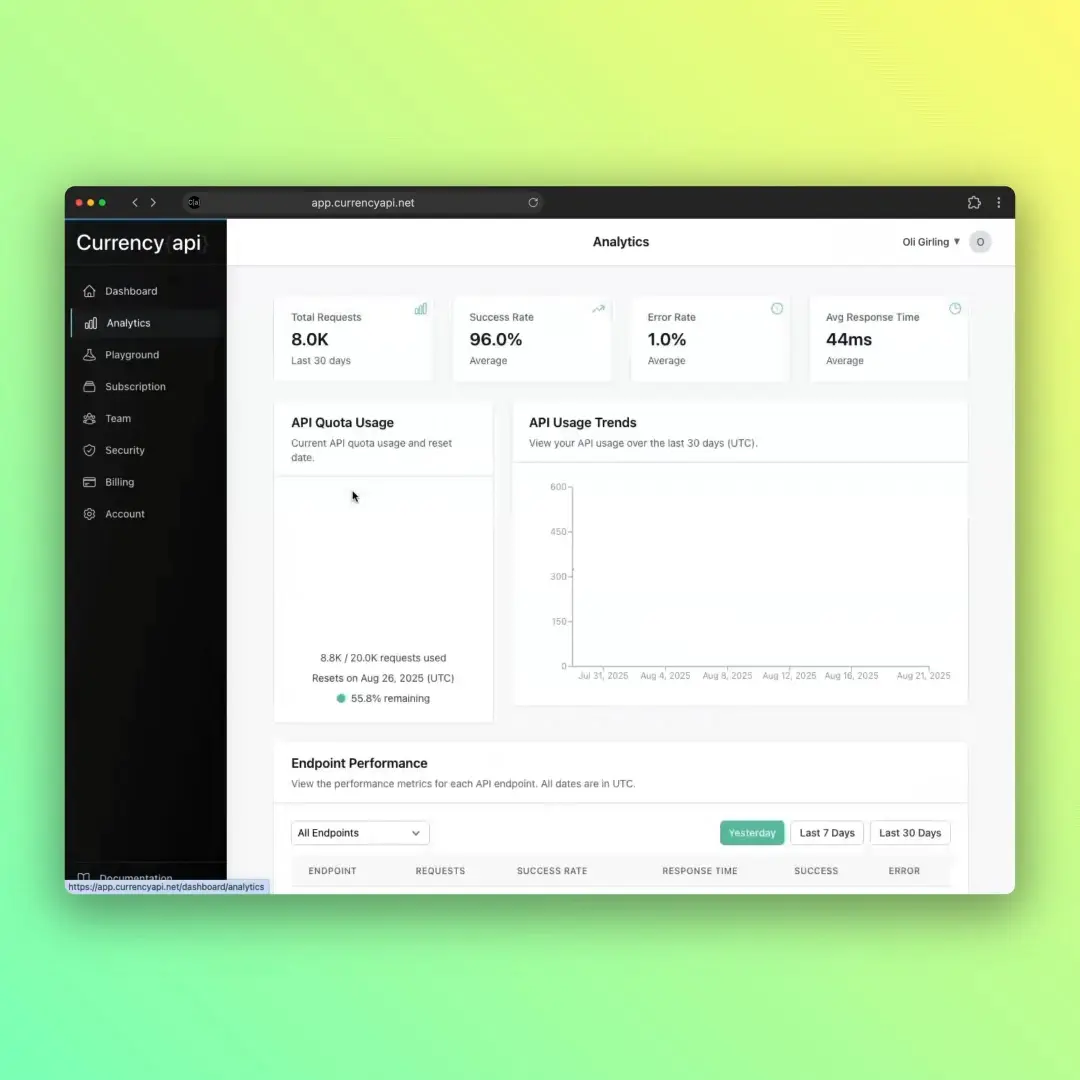
Dashboard Features
FAQs
Questions about using our API with Python? Below are some of our most asked questions or feel free to get in touch.
How do I install the Python SDK?
Install our Python SDK using pip: pip install currencyapinet. The SDK is available on PyPI and supports Python 3.5 and higher.
Once installed, import it with: from currencyapinet.currency import Currency. Then create an instance with your API key to start making requests.
Do I need to use the SDK, or can I use requests directly?
You can use either approach! The SDK provides a cleaner, more Pythonic interface with built-in error handling and type hints.
If you prefer, you can use the standard requests library directly with our REST API. Both approaches are fully supported and documented.
Does the Python SDK support async/await?
Yes, the Python SDK supports async/await.
If you want to find out more, checkout out the code in the Python SDK GitHub repository.
Can I use this with Django or Flask?
Absolutely! Our Python Currency API works seamlessly with Django, Flask, FastAPI, and any Python web framework.
You can integrate it into views, create custom management commands, or use it in background tasks. Check our Python SDK Documentation for framework-specific examples.
What Python versions are supported?
Our Python SDK supports Python 3.5 and higher. For direct API calls using the requests library, any Python version that supports requests will work.
We recommend Python 3.7+ for the best experience and latest language features.
How do I handle errors in Python?
Use Python's exception handling. The SDK raises exceptions for API errors, network issues, and invalid requests.
Wrap your API calls in try/except blocks: try: result = currency.rates().get() except Exception as e: print(f"Error: {e}")`. See our Error Handling Documentation for detailed examples.